Strings
Table of Contents
- What You Will Learn in This Blog
- What is a String
- Strings in Python – Immutability
- String Operations and Time Complexity
- Common String Methods
- Strings as Arrays
- Patterns and Techniques
- Summary
- Key Takeaways
- Practice Problems
- Next Steps
What You Will Learn in This Blog
- What a string is at the byte level – characters, ASCII, and Unicode
- How Python represents strings in memory
- Why strings in Python are immutable and what that means in practice
- All common string operations and their time complexity
- How to build strings efficiently and avoid a common O(n^2) trap
- Three patterns applied to strings: Sliding Window, Two Pointers, and Hashing
- Solved LeetCode problems for each pattern with full explanation
- A practice problem table for further study
What is a String
At the most fundamental level, a string is a sequence of characters. But computers do not natively understand characters – they only understand numbers. So every character is mapped to a number, and that number is stored in memory.
ASCII
The original encoding standard is ASCII (American Standard Code for Information Interchange). It maps 128 characters to numbers 0 through 127.
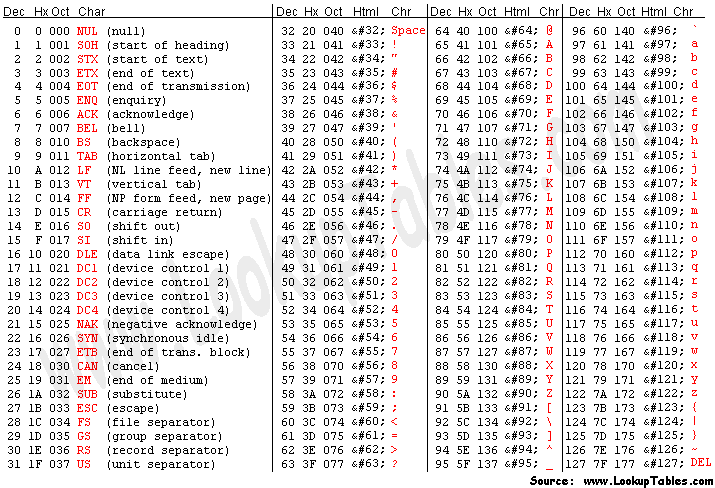
Some important ASCII values to know – you will use these in DSA problems:
| Character range | ASCII values | Notes |
|---|---|---|
| ‘0’ to ‘9’ | 48 to 57 | Digits |
| ‘A’ to ‘Z’ | 65 to 90 | Uppercase letters |
| ‘a’ to ‘z’ | 97 to 122 | Lowercase letters |
| ‘a’ - ‘A’ | 32 | Difference between lowercase and uppercase |
In Python, you convert between a character and its ASCII value using ord() and chr():
# ord() gives the ASCII (Unicode) value of a character
print(ord('a'))   # 97
print(ord('z'))   # 122
print(ord('A'))   # 65
print(ord('0'))   # 48

# chr() gives the character for a given value
print(chr(97))    # 'a'
print(chr(65))    # 'A'

# A very common DSA trick: get the position of a letter in the alphabet
# 'a' is position 0, 'b' is position 1, etc.
def letter_position(c):
    return ord(c) - ord('a')

print(letter_position('a'))  # 0
print(letter_position('e'))  # 4
print(letter_position('z'))  # 25
This trick – ord(c) - ord('a') – appears constantly in character frequency problems. It lets you use an array of size 26 as a frequency table instead of a dictionary.
Unicode
ASCII only covers 128 characters, which is enough for English but not for other languages. Unicode is the modern standard that covers over 140,000 characters across all human languages, symbols, and emoji.
Python 3 strings are Unicode by default. This means you can work with any language without any special setup.
s = "hello"       # ASCII characters -- each stored in 1 byte internally
s = "こんにちは"    # Japanese characters -- Unicode
s = "مرحبا"       # Arabic -- Unicode
s = "🐍"          # Emoji -- Unicode

# len() counts characters, not bytes
print(len("hello"))    # 5
print(len("こんにちは"))  # 5
For DSA problems, you will almost always be working with lowercase English letters (‘a’ to ‘z’) or alphanumeric characters. Unicode matters more in production software than in algorithmic problems.
Strings in Python – Immutability
In Python, strings are immutable. Once a string is created, it cannot be changed. Any operation that appears to modify a string actually creates a new string object in memory.

s = "hello"
print(id(s))       # memory address of s, e.g. 140234567890

s = s + " world"   # this does NOT modify "hello"
                   # it creates a NEW string "hello world" and s now points to it
print(id(s))       # different memory address -- it is a new object

# You cannot modify a character in place -- this raises a TypeError
s = "hello"
s[0] = "H"         # TypeError: 'str' object does not support item assignment
This is fundamentally different from lists, which are mutable:
# List -- mutable, can be changed in place
nums = [1, 2, 3]
nums[0] = 99       # works fine
print(nums)        # [99, 2, 3]

# String -- immutable, cannot be changed in place
s = "hello"
s[0] = "H"         # TypeError
Why does immutability matter for DSA?
It has a direct impact on performance. Because you cannot modify a string in place, building a string character by character in a loop is expensive if done naively.
# The wrong way -- O(n^2)
# Each += creates a brand new string and copies everything
result = ""
for char in ["h", "e", "l", "l", "o"]:
    result += char   # creates a new string each time

# The right way -- O(n)
# Accumulate parts in a list, join once at the end
parts = []
for char in ["h", "e", "l", "l", "o"]:
    parts.append(char)    # O(1) append
result = "".join(parts)   # one O(n) join at the end

print(result)  # "hello"
This is one of the most common performance mistakes beginners make with strings. Always use "".join(list) when building strings in a loop.
String Operations and Time Complexity
| Operation | Example | Time Complexity | Notes |
|---|---|---|---|
| Access by index | s[i] | O(1) | |
| Length | len(s) | O(1) | Stored internally |
| Slice | s[i:j] | O(k) | k = j - i, creates a new string |
| Concatenation | s1 + s2 | O(n + m) | Creates a new string |
| Search substring | s.find(t) | O(n * m) | n = len(s), m = len(t) |
| Membership | t in s | O(n * m) | Same as find |
| Split | s.split() | O(n) | Creates a list of substrings |
| Join | "".join(lst) | O(n) | n = total characters |
| Replace | s.replace(a, b) | O(n) | Scans entire string |
| Strip | s.strip() | O(n) | Scans from both ends |
| Upper / Lower | s.upper() | O(n) | Creates a new string |
| String building in loop with += | s += c (in loop) | O(n^2) | Avoid this |
| String building with join | "".join(parts) | O(n) | Always prefer this |
Note on slicing: Every time you slice a string in Python, a new string object is created. This means
s[i:j]costs O(k) in both time and space where k is the length of the slice. This is different from some other languages where slices are views into the original string.
Common String Methods
These are the methods you will use most often in DSA problems.
s = "  Hello, World!  "

# Case conversion
print(s.lower())          # "  hello, world!  "
print(s.upper())          # "  HELLO, WORLD!  "

# Whitespace removal
print(s.strip())          # "Hello, World!"
print(s.lstrip())         # "Hello, World!  "  (left only)
print(s.rstrip())         # "  Hello, World!"  (right only)

# Search and check
print(s.find("World"))    # 9  (index of first occurrence, -1 if not found)
print(s.count("l"))       # 3  (count of occurrences)
print(s.startswith("  H"))  # True
print(s.endswith("!  "))    # True

# Split and join
words = "apple,banana,cherry".split(",")
print(words)              # ['apple', 'banana', 'cherry']
print(",".join(words))    # "apple,banana,cherry"

sentence = "hello world python"
print(sentence.split())   # ['hello', 'world', 'python'] (splits on whitespace)

# Replace
print("hello world".replace("world", "python"))  # "hello python"

# Check character types
print("abc".isalpha())    # True  -- all alphabetic
print("123".isdigit())    # True  -- all digits
print("abc123".isalnum()) # True  -- all alphanumeric
print("  ".isspace())     # True  -- all whitespace
print("Hello".islower())  # False
print("Hello".isupper())  # False
print("HELLO".isupper())  # True
Strings as Arrays
Even though strings are immutable, you can treat them like arrays for reading purposes – index into them, slice them, iterate over them.
s = "hello"

# Indexing -- O(1)
print(s[0])    # 'h'
print(s[-1])   # 'o'

# Slicing -- O(k)
print(s[1:4])  # 'ell'
print(s[::-1]) # 'olleh'  -- reversed string

# Iterating
for char in s:
    print(char)

# Enumerate -- gives index and character
for i, char in enumerate(s):
    print(i, char)
# 0 h
# 1 e
# 2 l
# 3 l
# 4 o

# Convert to list if you need to modify
chars = list(s)     # ['h', 'e', 'l', 'l', 'o']
chars[0] = 'H'      # now you can modify
result = "".join(chars)  # 'Hello'
Patterns and Techniques
The three patterns we introduce here are the same ones introduced in the Arrays blog. If you have not read that blog yet, the links below point to the original explanations.
The goal here is to see the same patterns applied to strings. Seeing a pattern in two different contexts is one of the best ways to truly internalise it.
Pattern 1 – Two Pointers on Strings
The core idea (same as arrays): use two index variables moving through the string, typically from opposite ends toward the middle. This avoids creating a reversed copy and keeps space at O(1).
When to use it on strings:
- Palindrome checking
- Reversing a string or parts of a string in place (on a character list)
- Comparing characters from both ends
The template:
left, right = 0, len(s) - 1

while left < right:
    # compare s[left] and s[right]
    # move pointers based on the condition
    left += 1
    right -= 1
Solved Problem – Valid Palindrome II
LeetCode 680 – Valid Palindrome II
Problem: Given a string s, return True if it can become a palindrome after deleting at most one character.
Input:  s = "abca"
Output: True  (remove 'b' or 'c' to get "aca" or "aba")

Input:  s = "abc"
Output: False
Thinking through it:
Use two pointers from both ends. As long as characters match, move both pointers inward. When you hit a mismatch, you have one delete to use – try skipping the left character or the right character and check if either resulting substring is a palindrome.
def valid_palindrome(s: str) -> bool:
    """
    Two pointers from both ends.
    On first mismatch, try skipping left character or right character.
    If either skip produces a palindrome, return True.

    Time complexity:  O(n) -- we scan the string at most twice
    Space complexity: O(1) -- only index variables, no new strings stored
                             (the is_palindrome check uses indices, not slices)
    """

    def is_palindrome(s, left, right):
        """Check if s[left..right] is a palindrome using two pointers."""
        while left < right:
            if s[left] != s[right]:
                return False
            left += 1
            right -= 1
        return True

    left, right = 0, len(s) - 1

    while left < right:
        if s[left] != s[right]:
            # Mismatch -- try skipping left character or right character
            # If either works, we can make a palindrome with one deletion
            return (is_palindrome(s, left + 1, right) or
                    is_palindrome(s, left, right - 1))
        left += 1
        right -= 1

    return True  # no mismatch found -- already a palindrome

# Test
print(valid_palindrome("abca"))   # True
print(valid_palindrome("abc"))    # False
print(valid_palindrome("racecar")) # True (already a palindrome)
print(valid_palindrome("deeee"))  # True (remove one 'e')
Solved Problem – Reverse String
Problem: Write a function that reverses a string. The input is given as an array of characters s. You must do it in-place with O(1) extra memory.
Input:  s = ['h','e','l','l','o']
Output: ['o','l','l','e','h']
Thinking through it:
Classic two pointers. Swap the characters at left and right, then move both pointers inward. Stop when they meet in the middle.
def reverse_string(s: list) -> None:
    """
    Swap characters from both ends moving inward.
    Modifies the list in place -- nothing is returned.

    Time complexity:  O(n) -- each character is visited once
    Space complexity: O(1) -- swapping in place, no extra memory
    """
    left, right = 0, len(s) - 1

    while left < right:
        # Swap characters at left and right
        s[left], s[right] = s[right], s[left]
        left += 1
        right -= 1

# Test
s = ['h','e','l','l','o']
reverse_string(s)
print(s)  # ['o', 'l', 'l', 'e', 'h']
Pattern 2 – Sliding Window on Strings
The core idea (same as arrays): maintain a window defined by two pointers left and right that slides across the string. Expand by moving right forward, shrink by moving left forward. This avoids checking every substring from scratch and gives O(n) solutions to problems that would otherwise be O(n^2) or worse.
When to use it on strings:
- Longest substring with some constraint (no repeating characters, at most k distinct characters)
- Smallest substring containing all required characters
- Counting substrings that satisfy a condition

The variable window template for strings:
from collections import defaultdict

def sliding_window_string(s):
    left = 0
    window = defaultdict(int)   # track character counts in the window
    result = 0

    for right in range(len(s)):
        # Expand: add s[right] to the window
        window[s[right]] += 1

        # Shrink: while window violates the condition, move left forward
        while # window condition is violated:
            window[s[left]] -= 1
            if window[s[left]] == 0:
                del window[s[left]]
            left += 1

        # Window is now valid -- update result
        result = max(result, right - left + 1)

    return result
Solved Problem – Longest Substring Without Repeating Characters
LeetCode 3 – Longest Substring Without Repeating Characters
Problem: Given a string s, find the length of the longest substring without repeating characters.
Input:  s = "abcabcbb"
Output: 3  (substring "abc")

Input:  s = "bbbbb"
Output: 1  (substring "b")

Input:  s = "pwwkew"
Output: 3  (substring "wke")
Thinking through it:
The brute force checks every substring – O(n^2) or O(n^3). Using a sliding window, we maintain a window that never contains a duplicate. When we add a character that is already in the window, we shrink from the left until the duplicate is gone. We track the maximum window size seen.
def length_of_longest_substring(s: str) -> int:
    """
    Sliding window with a set tracking characters in the current window.
    Expand right, shrink left when a duplicate is found.

    Time complexity:  O(n) -- each character is added and removed at most once
    Space complexity: O(min(n, a)) -- a is the size of the character set (26 for
                                      lowercase letters, 128 for ASCII)
    """
    char_set = set()    # characters currently in the window
    left = 0
    max_length = 0

    for right in range(len(s)):
        # Shrink window from left until s[right] is no longer a duplicate
        while s[right] in char_set:
            char_set.remove(s[left])   # remove leftmost character
            left += 1                  # shrink window

        # Now s[right] is not in the window -- safe to add it
        char_set.add(s[right])

        # Update maximum length
        max_length = max(max_length, right - left + 1)

    return max_length

# Test
print(length_of_longest_substring("abcabcbb"))  # 3
print(length_of_longest_substring("bbbbb"))      # 1
print(length_of_longest_substring("pwwkew"))     # 3
print(length_of_longest_substring(""))           # 0
Let us trace through "abcabcbb" to make sure the logic is clear:
| right | s[right] | char_set before | Action | char_set after | left | max_length |
|---|---|---|---|---|---|---|
| 0 | ‘a’ | {} | add ‘a’ | {‘a’} | 0 | 1 |
| 1 | ‘b’ | {‘a’} | add ‘b’ | {‘a’,‘b’} | 0 | 2 |
| 2 | ‘c’ | {‘a’,‘b’} | add ‘c’ | {‘a’,‘b’,‘c’} | 0 | 3 |
| 3 | ‘a’ | {‘a’,‘b’,‘c’} | remove ‘a’, left=1, add ‘a’ | {‘b’,‘c’,‘a’} | 1 | 3 |
| 4 | ‘b’ | {‘b’,‘c’,‘a’} | remove ‘b’, left=2, add ‘b’ | {‘c’,‘a’,‘b’} | 2 | 3 |
| 5 | ‘c’ | {‘c’,‘a’,‘b’} | remove ‘c’, left=3, add ‘c’ | {‘a’,‘b’,‘c’} | 3 | 3 |
| 6 | ‘b’ | {‘a’,‘b’,‘c’} | remove ‘a’, remove ‘b’, left=5, add ‘b’ | {‘c’,‘b’} | 5 | 3 |
| 7 | ‘b’ | {‘c’,‘b’} | remove ‘c’, remove ‘b’, left=7, add ‘b’ | {‘b’} | 7 | 3 |
Solved Problem – Minimum Window Substring
LeetCode 76 – Minimum Window Substring
Problem: Given two strings s and t, return the minimum window substring of s such that every character in t (including duplicates) is included in the window. If no such window exists, return "".
Input:  s = "ADOBECODEBANC", t = "ABC"
Output: "BANC"

Input:  s = "a", t = "a"
Output: "a"

Input:  s = "a", t = "aa"
Output: ""
Thinking through it:
This is a variable sliding window problem. We need to find the smallest window in s that contains all characters of t. We expand the window by moving right forward. When the window contains all characters of t, we try to shrink it from the left to find the minimum. We use two frequency maps – one for what we need (t_count) and one for what the current window has (window_count).
from collections import Counter

def min_window(s: str, t: str) -> str:
    """
    Sliding window with two frequency maps.
    Expand right until window contains all of t.
    Then shrink left to find the minimum valid window.
    Repeat until right reaches the end.

    Time complexity:  O(n + m) -- n = len(s), m = len(t)
                                  each character in s is added and removed at most once
    Space complexity: O(m) -- the frequency maps store at most m distinct characters
    """
    if not t or not s:
        return ""

    # Frequency map for characters we need
    t_count = Counter(t)

    # Number of unique characters in t that we still need to satisfy
    required = len(t_count)

    # Sliding window pointers and state
    left = 0
    formed = 0          # how many unique chars in t are currently satisfied in window
    window_count = {}   # frequency of characters in current window

    # Result: (window length, left index, right index)
    result = float('inf'), 0, 0

    for right in range(len(s)):
        # Add s[right] to the window
        char = s[right]
        window_count[char] = window_count.get(char, 0) + 1

        # Check if this character's frequency now satisfies t's requirement
        if char in t_count and window_count[char] == t_count[char]:
            formed += 1

        # Try to shrink the window from left while it is still valid
        while left <= right and formed == required:
            # This window is valid -- update result if it is smaller
            window_length = right - left + 1
            if window_length < result[0]:
                result = (window_length, left, right)

            # Remove s[left] from the window
            left_char = s[left]
            window_count[left_char] -= 1
            if left_char in t_count and window_count[left_char] < t_count[left_char]:
                formed -= 1   # window no longer satisfies this character
            left += 1

    if result[0] == float('inf'):
        return ""
    return s[result[1] : result[2] + 1]

# Test
print(min_window("ADOBECODEBANC", "ABC"))  # "BANC"
print(min_window("a", "a"))                # "a"
print(min_window("a", "aa"))               # ""
Pattern 3 – Hashing for String Problems
The core idea: Use a dictionary or array of size 26 to count character frequencies. Many string problems reduce to comparing or manipulating these frequency counts. This turns O(n * m) brute force comparisons into O(n + m).
When to use it:
- Anagram detection (do two strings have the same characters?)
- Grouping strings by their character composition
- Finding strings that are permutations of each other
- Any problem involving character frequency

Two approaches to frequency counting:
from collections import Counter

s = "hello"

# Approach 1: Counter (cleanest)
freq = Counter(s)
print(freq)   # Counter({'l': 2, 'h': 1, 'e': 1, 'o': 1})

# Approach 2: Dictionary manually
freq = {}
for char in s:
    freq[char] = freq.get(char, 0) + 1

# Approach 3: Fixed array of size 26 (most efficient for lowercase letters)
# Index 0 = 'a', index 1 = 'b', ..., index 25 = 'z'
freq = [0] * 26
for char in s:
    freq[ord(char) - ord('a')] += 1
print(freq)  # [0, 0, 0, 0, 1, 0, 1, 0, 0, 0, 0, 2, 0, 0, 1, 0, ...]
#                              e        h           l  l        o
Solved Problem – Valid Anagram
Problem: Given two strings s and t, return True if t is an anagram of s, and False otherwise. An anagram uses the same characters the same number of times.
Input:  s = "anagram", t = "nagaram"
Output: True

Input:  s = "rat", t = "car"
Output: False
Thinking through it:
Two strings are anagrams if and only if they have exactly the same character frequencies. We have three approaches, each worth knowing.
from collections import Counter

def is_anagram_v1(s: str, t: str) -> bool:
    """
    Approach 1: Sort both strings and compare.
    Two strings are anagrams if their sorted versions are equal.

    Time complexity:  O(n log n) -- sorting
    Space complexity: O(n) -- sorted() creates new strings
    """
    return sorted(s) == sorted(t)


def is_anagram_v2(s: str, t: str) -> bool:
    """
    Approach 2: Use Counter to compare frequency maps.
    Clean and Pythonic.

    Time complexity:  O(n + m) -- build two counters, compare them
    Space complexity: O(1) -- at most 26 distinct characters (lowercase letters)
    """
    return Counter(s) == Counter(t)


def is_anagram_v3(s: str, t: str) -> bool:
    """
    Approach 3: Single frequency array of size 26.
    Increment for each character in s, decrement for each in t.
    If all values are 0 at the end, they are anagrams.

    Time complexity:  O(n + m)
    Space complexity: O(1) -- fixed array of size 26 regardless of input size
    """
    if len(s) != len(t):
        return False

    count = [0] * 26

    for i in range(len(s)):
        count[ord(s[i]) - ord('a')] += 1   # increment for s
        count[ord(t[i]) - ord('a')] -= 1   # decrement for t

    # If all counts are 0, every character balanced out
    return all(c == 0 for c in count)

# Test all three
for fn in [is_anagram_v1, is_anagram_v2, is_anagram_v3]:
    print(fn("anagram", "nagaram"))  # True
    print(fn("rat", "car"))          # False
Solved Problem – Group Anagrams
Problem: Given an array of strings strs, group the anagrams together. You can return the answer in any order.
Input:  strs = ["eat","tea","tan","ate","nat","bat"]
Output: [["bat"],["nat","tan"],["ate","eat","tea"]]
Thinking through it:
Two strings are anagrams if their sorted versions are equal. So we can use the sorted version of each string as a key in a dictionary and group strings with the same key together.
from collections import defaultdict

def group_anagrams(strs: list) -> list:
    """
    Sort each string to get a canonical key.
    All anagrams will have the same key.
    Group strings by their key using a defaultdict.

    Time complexity:  O(n * k log k) -- n strings, each of length at most k, sorted
    Space complexity: O(n * k) -- storing all strings in the groups dictionary
    """
    groups = defaultdict(list)

    for s in strs:
        key = tuple(sorted(s))   # sorted string as the key
                                  # use tuple because lists cannot be dict keys
        groups[key].append(s)

    return list(groups.values())

# Test
print(group_anagrams(["eat","tea","tan","ate","nat","bat"]))
# [['eat', 'tea', 'ate'], ['tan', 'nat'], ['bat']]
Alternative approach using character count as key:
def group_anagrams_v2(strs: list) -> list:
    """
    Use a frequency array of size 26 as the key instead of sorting.
    This is slightly faster: O(n * k) instead of O(n * k log k).

    Time complexity:  O(n * k) -- n strings, each of length at most k
    Space complexity: O(n * k)
    """
    groups = defaultdict(list)

    for s in strs:
        # Build frequency array for this string
        count = [0] * 26
        for char in s:
            count[ord(char) - ord('a')] += 1

        key = tuple(count)   # convert to tuple so it can be used as a dict key
        groups[key].append(s)

    return list(groups.values())
Summary
What We Covered
| Topic | Key Point |
|---|---|
| Characters and ASCII | Every character maps to a number. ord() and chr() convert between them |
| Unicode | Python 3 strings support all languages. For DSA, assume lowercase English unless stated |
| Immutability | Strings cannot be changed in place. Every modification creates a new string |
| String building | Never use += in a loop. Append to a list and join at the end |
| Strings as arrays | You can index, slice, and iterate over strings like arrays, but not modify them |
Operation Complexity at a Glance
| Operation | Complexity | Notes |
|---|---|---|
Access by index s[i] | O(1) | |
Length len(s) | O(1) | |
Slice s[i:j] | O(k) | Creates a new string |
Concatenation s1 + s2 | O(n + m) | Creates a new string |
String build with += in loop | O(n^2) | Avoid |
String build with join | O(n) | Always prefer |
Search t in s | O(n * m) | |
| Split, replace, upper, lower | O(n) |
Patterns Applied to Strings
| Pattern | Core Idea | Time Complexity | Use When |
|---|---|---|---|
| Two Pointers | Two indices from both ends moving inward | O(n) | Palindrome, reverse, pair matching |
| Sliding Window | Expand right, shrink left, maintain window state | O(n) | Longest/shortest substring with a constraint |
| Hashing / Frequency Count | Count character frequencies and compare | O(n) | Anagram, grouping, permutation problems |
Key Takeaways
- Strings are immutable in Python. Any change creates a new string. Building strings with
+=in a loop is O(n^2) – always use"".join(list)instead. ord(c) - ord('a')gives the position of a lowercase letter in the alphabet. This lets you use a fixed array of size 26 as a frequency table, which is more efficient than a dictionary for lowercase letter problems.- Two Pointers on strings works exactly like on arrays – just use indices, not the characters directly. This keeps space at O(1).
- Sliding Window on strings tracks character counts in the window. When the window violates the constraint, shrink from the left.
- Two strings are anagrams if and only if their character frequency maps are equal. Sort-and-compare is O(n log n). Frequency-count-and-compare is O(n).
Practice Problems
Work through these on your own. Identify the pattern before writing any code.
| Problem | Link | Difficulty | Pattern |
|---|---|---|---|
| Reverse String | LC 344 | Easy | Two Pointers |
| Valid Palindrome | LC 125 | Easy | Two Pointers |
| Valid Anagram | LC 242 | Easy | Hashing |
| Longest Common Prefix | LC 14 | Easy | String traversal |
| First Unique Character | LC 387 | Easy | Hashing |
| Valid Palindrome II | LC 680 | Easy | Two Pointers |
| Longest Substring Without Repeating Characters | LC 3 | Medium | Sliding Window |
| Group Anagrams | LC 49 | Medium | Hashing |
| Longest Repeating Character Replacement | LC 424 | Medium | Sliding Window |
| Minimum Window Substring | LC 76 | Hard | Sliding Window |
| Permutation in String | LC 567 | Medium | Sliding Window + Hashing |
| Find All Anagrams in a String | LC 438 | Medium | Sliding Window + Hashing |
Next Steps
- Next blog: [Linked Lists] – a data structure where elements are not stored contiguously in memory, and how that changes everything about insertion, deletion, and traversal
- Reference: Codeverra DSA Sheet